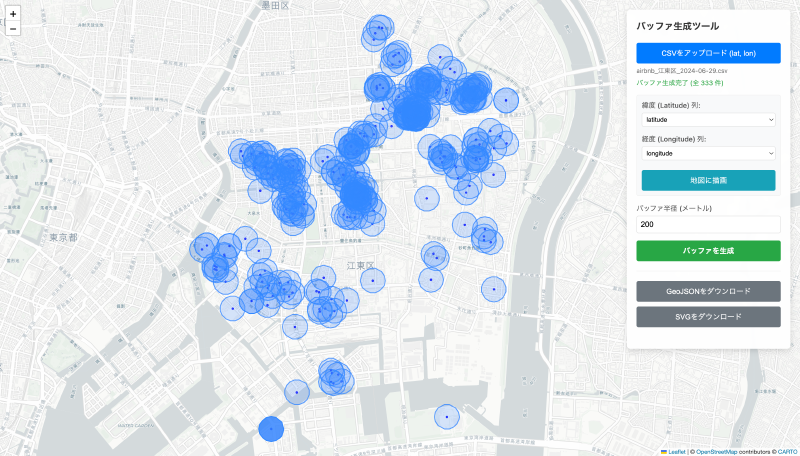

What is this tool?
A web-based spatial analysis tool that generates “buffers (buffer zones)” at a specified distance around geospatial data (points, lines, polygons).
A buffer is a polygon area that expands a specified distance around a given feature, and is a technique commonly used in GIS spatial analysis.
When creating data maps with buffers such as “within a 10-minute walk from a certain point,” using the desktop application QGIS requires the following steps:
- Convert the data file from a geographic coordinate system to a projected coordinate system that varies by region
- Perform the buffering operation
- Convert back to the geographic coordinate system for output
This tool eliminates this complex workflow, enabling completion in just a few clicks within the browser.
Features
- Buffer generation Creates a buffer zone at a specified distance (radius) around the input points, lines, or polygons.
- Map preview View the loaded data and generated buffer areas on a web map.
- Output format Download buffer results as GeoJSON or SVG.
How to use
- Upload CSV data…Select a CSV file containing latitude and longitude columns.
- Specify buffer parameters…Enter the buffer radius (in meters).
- Generate and review the buffer…Press the create button, and the buffer areas are drawn on the map.
- Download…Download the results in GeoJSON or SVG format.
Data formats
- Input formats
- CSV (tabular data containing latitude and longitude) is loaded for processing.
- Output formats
- GeoJSON: Retrieve the generated buffer areas in GeoJSON format.
- SVG: Download as an SVG vector image.